Digital Building Directory Signage

Enhance your visitor's experience with modern digital lobby signage and digital directories.

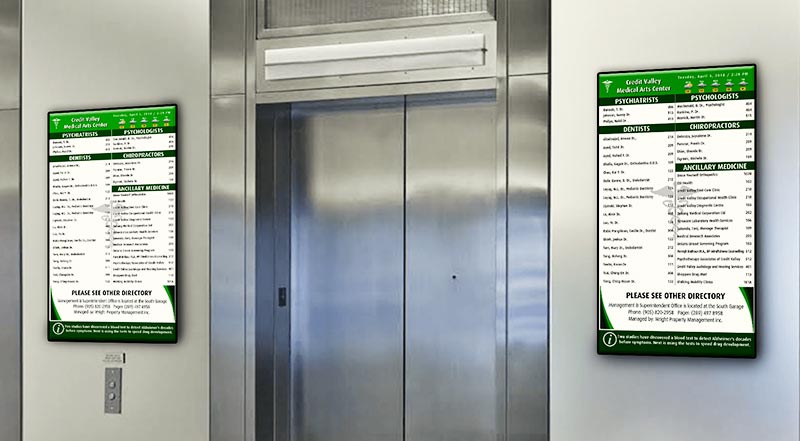
Portrait digital directory beside elevator

Netvisual provides state-of-the-art digital directory boards, digital physician directories, and a wide variety of other electronic directories for office buildings and businesses. Our easy-to-use digital directory software allows your property managers to effortlessly manage tenant listings, meeting schedules, daily events, announcements, and more. Experience convenience and flexibility with our state-of-the-art digital signage technology and commercial-grade screens.

Digital building directories at a glance

A digital building directory is a screen in your lobby that lists tenants, suite numbers, floor plans and announcements. Your property manager updates it online from the Netvisual CMS, so a change takes a few clicks instead of a reprint. Netvisual supplies the screens, software, design, installation and 24/7 support for office buildings, medical buildings, condos, retirement residences and other public spaces across Canada and the USA.

  • Since 2004designing and installing digital signage
  • Canada and the USAinstallation across North America
  • 24/7technical support
  • Free quoteand demo on request

Last updated: November 19, 2026

How a digital building directory works

A directory has three parts, and Netvisual provides all of them. Your tenant list lives in the Netvisual CMS, and the screen in your lobby shows whatever you publish.

  • Commercial-grade display

    A professional screen built to run all day in a lobby, in portrait or landscape, with or without touch.

  • Media player

    A small computer behind the screen that stores the content and runs the directory.

  • Netvisual CMS

    The online software where your property manager updates tenants, announcements and ads for one screen or many.

Need to update when there is no internet? See how the local connection works. Wondering about installation? Read about our installation service.

Digital vs printed directories

What changes when a printed or static directory is replaced by a Netvisual digital directory.

Printed directory compared with a digital directory
Printed or static directoryNetvisual digital directory
Changing a tenantReprint or replace a sign or insertEdit in the CMS; the screen updates in an instant
Announcements and eventsNot possible, or a separate notice boardShown on the same screen, scheduled by day and time
Emergency informationNot availableEmergency mode shows only the essential instructions
Floor plans and mapsFixed printed map2D or 3D maps built from your floor plans
Advertising and leasingNot availableDedicated space for ads and available units
LanguagesOne language, or crowded signsThe same content in several languages
Several buildingsManaged one sign at a timeOne CMS sends updates to one, several or all screens

Portrait or landscape?

Both orientations work in multiple screen sizes. This is how we usually think about the choice.

Portrait and landscape digital directories
PortraitLandscape
Works well inNarrow spaces, beside elevatorsWide walls and large lobbies
LayoutLong tenant list, one column of contentTenant list with a map or ads next to it

Features of Our Digital Building Directories

Digital building display for an office building

Easily Display Tenant Information

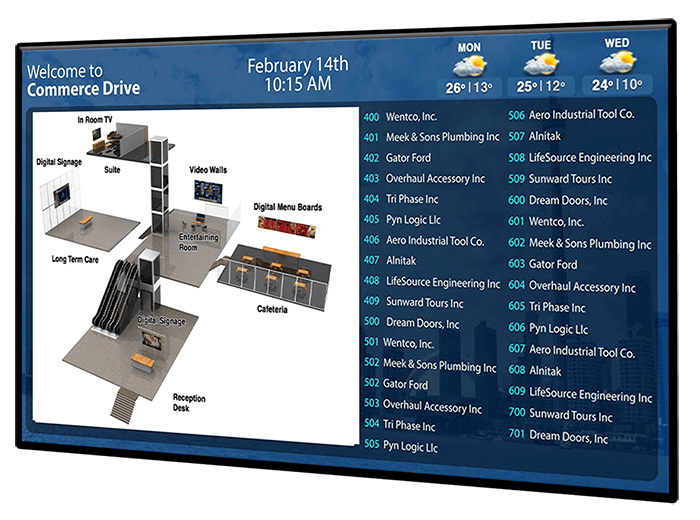
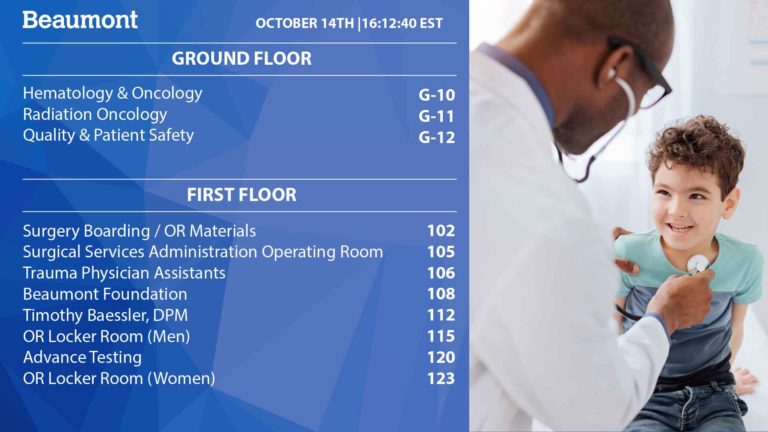
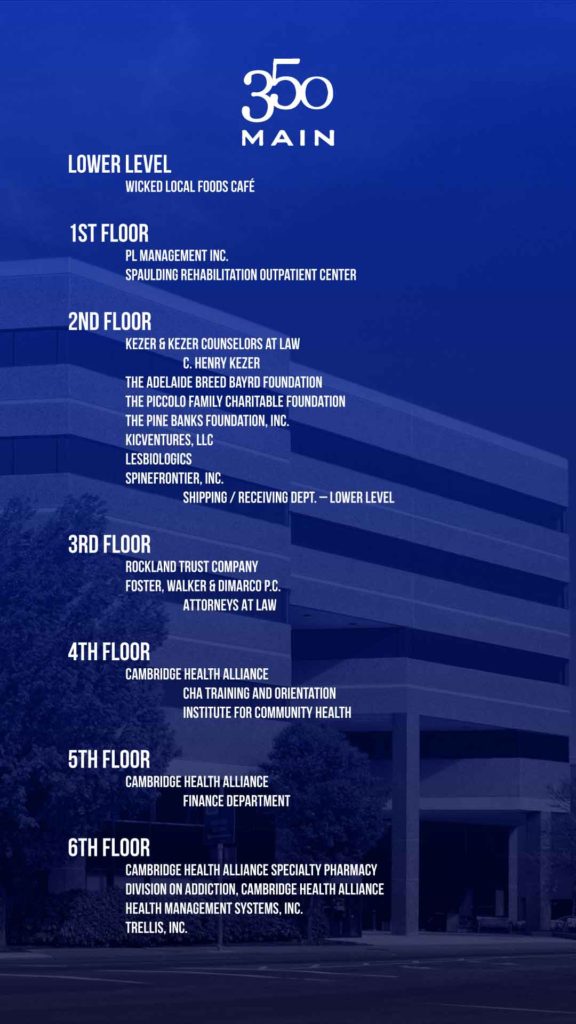
Easily list tenants and display relevant information using Netvisual’s digital signage for office buildings. Our easy to use software allows you to dynamically showcase information such as suite numbers, logos, building maps, announcements, and more. Enhance tenant visibility, enable seamless navigation for your visitors, and make instant edits with Netvisual’s electronic directory boards.

Remotely Schedule with our Building Directory Software

Take control of your digital directories with Netvisual’s easy-to-use content management system for digital directory signage. Our software allows you to effortlessly manage, update, and change your directories from a centralized online platform. In just a few clicks you can add, edit, or remove information and ensure that your directories are always up to date. 

digital building directory being changed remotely
Digital building directory being changed via phone

Digital Directory Displays that Don't Need a WIFI Network

Netvisual understands the importance of seamless connectivity for your digital directory boards, whether you have a WiFi network or not. Even when internet access is limited, our direct wireless connectivity feature allows you to connect to your signage locally. Experience seamless connectivity using your mobile phone, laptop, tablet, or desktop computer and ensure your electronic building directory is always up to date.

Display Floor Plans & Digital Building Maps

Enhance navigation and elevate user experience by incorporating detailed floor plans and building maps into your digital directory solutions. Whether you prefer more traditional 2D floor plans, or a more modern and immersive 3D experience, our software offers the flexibility to choose what best suits your needs. Additionally, Netvisual’s digital directory software is designed to work with your existing floor plans, ensuring installation and design is quick and easy.

Digital building directory with a map of the building
Digital Directory and building map

Prominently Showcase Leasing Information

Optimize your digital signage directory to display relevant leasing information to tenants and visitors. From available units to tenant vacation schedules, and even leasing contact information, your interior directory sign can display information in a dynamic and attractive way. Keep prospective tenants informed about the availability of units and fill vacancies faster than ever before with our lobby signage software.

Generate Revenue With Ads on your Electronic Directory

Maximize the revenue potential of your digital building directory installation by dedicating a space of your choice for paid advertisements. Whether these ads are promoting tenant specials, local services, or other relevant third party services, our directory signage provides a valuable advertising opportunity and revenue source. If you are unsure of where to place your advertisements, rely on the expertise of our designers and technical staff with a free demo or a free consultation.

Digital building directory with ad space
Digital building directory with announcement section

Update Your Announcements in Real Time

Empower effective communication and ensure your tenants and visitors are always informed with our digital office directory signage. Using our intuitive digital signage software your staff can make edits in an instant, both remotely and locally; if your building has multiple signage installations, then you can easily deploy your updates to one, multiple, or all locations in an instant. Whether you are notifying tenants about upcoming maintenance, sharing community events, or promoting building wide initiatives, our directory software provides a convenient and efficient digital platform for sharing announcements.


Emergency Mode Feature on all Digital Directory Boards

In the event of an emergency, ensure the safety and well-being of tenants and visitors with Netvisual’s emergency mode feature. During an emergency, our digital building directories can seamlessly and instantly transition to emergency mode. This feature displays only the most important and relevant information to properly guide individuals in times of crisis. Display essential instructions, emergency contact details, evacuation routes, and more with our electronic office directories.

Digital announcement screen
Digital building directory with announcement screens in different languages

Turn Your Digital Office Directory into a Multi-Language Display

Enhance inclusivity by incorporating a diverse selection of local languages in your digital building directories. Our directory software allows you to display the same information in multiple languages when needed, ensuring all tenants and visitors have equal access to your facility. For digital directories that need more space, this feature also allows you to make only the most important sections multilingual.

Compatible with Both Portrait and Landscape Directories

Choose the screen size and orientation that best suits your space, and ensure that the installation of your new digital building directory is seamless. Our directories are compatible with both landscape and portrait orientation, as well as multiple screen sizes, to maximize engagement and visibility in your desired space. Elevate your building’s presence with our versatile orientation and screen size options, and make a lasting impression on everybody who interacts with your directories.

Landscape and portrait digital directories

Interactive Digital Building Directories

Digital Directories with Search Functionality

Interactive Digital Building Directories Enhance User Experience

Interactive building directories, or touch building directories, are equipped with advanced search functionality that allows guests to find information with ease. Adding a modern edge to any space, these displays are even capable of interactive maps that highlight routes and display directions. 

Contact our Digital Directory Experts

Some of our digital directories

Real installations, designed around each building’s brand and tenants.

See the full directory gallery · Interactive touch directories

4.8 out of 5 from 27 Google reviews. Read our Google reviews or client testimonials.

Digital building directory questions, answered

Short answers to what property managers ask us most. Need something specific? Ask our team.

What is a digital building directory?

A digital building directory is a screen that shows tenant listings, suite numbers, floor plans, announcements and other information to visitors and tenants. It is also called a digital lobby sign, electronic directory, digital tenant directory or digital directory board. It is used in office buildings, medical buildings, hospitals, shopping malls and other public spaces, and replaces printed directories that need to be reprinted for every change.

What information can be displayed on a digital building directory?

Tenant listings with suite numbers and logos, contact information, floor plans and building maps, event schedules, announcements, leasing information and available units, and paid advertising. The information can change by location, by time of day or by day of the week.

How do I update the tenant list?

The directory is connected to the Netvisual content management system (CMS), so your property manager adds, edits or removes tenants from a central online platform in a few clicks. Changes can be made remotely or locally, from a phone, tablet, laptop or desktop computer, and can be sent to one, several or all of your screens.

Does a digital directory need a WiFi network or internet connection?

No. Even when internet access is limited, the direct wireless connection feature lets you connect to the signage locally from a mobile phone, laptop, tablet or desktop computer and update it. When an internet connection is available, you can also manage the directory remotely.

Can the directory show floor plans and building maps?

Yes. Directories can show 2D floor plans or a more immersive 3D experience. Netvisual’s directory software is designed to work with your existing floor plans, so installation and design are quick and easy.

Can a digital directory be a touch screen?

Yes. Interactive building directories, also called touch directories, include search so visitors can find a tenant on their own, and interactive maps that highlight routes and show directions. Non-touch directories are also available when you only need to display information.

Can a digital directory display emergency information?

Yes. Every Netvisual digital directory has an emergency mode. When it is triggered, the screen switches instantly to show only the most important information, such as essential instructions, emergency contact details and evacuation routes.

Can a digital directory show advertising?

Yes. You can dedicate a space of your choice on the screen to paid advertisements, such as tenant specials, local services or third-party services. This can turn the directory into a source of revenue. Our designers can help you decide where to place the ads.

Can the directory display more than one language?

Yes. The software can show the same information in several local languages, or only the most important sections in more than one language when space is limited, so every tenant and visitor has equal access to the information.

Should the directory be portrait or landscape?

Both orientations are supported, in multiple screen sizes. Portrait screens suit narrow spaces such as beside an elevator. Landscape screens suit wide walls and layouts that show a map or advertising next to the tenant list. We recommend an orientation and size once we know your space.

How much does a digital building directory cost?

The price depends on the number of screens, their size and orientation, whether they are touch or non-touch, and the design of the directory. Request a free quote or demo and our team will recommend a solution for your building.

Is digital lobby signage easy to install and maintain?

Yes, digital lobby signage is designed to be easy to install, update and maintain, both physically and digitally. Regular maintenance, including software updates, can be done in-house or by our technical experts. At Netvisual we offer installation services across North America, as well as 24/7 technical support to ensure your electronic directory is always running smoothly.

One provider for the whole directory

Netvisual is a full-service provider of digital signage solutions. Screens, software, design, installation and support come from one team.

  • Commercial-grade screens

    Professional displays built to run all day in a lobby.

  • Intuitive content management

    Update tenants and announcements from the Netvisual CMS.

  • Seamless installation

    Installation services across North America.

  • Custom content creation

    Our designers create your directory design and content.

  • Simple remote management

    Edit from anywhere, or locally when there is no WiFi.

  • Scalable from one screen to many

    Send updates to one, several or all of your screens.

  • Dedicated technical support

    24/7 technical support to keep the directory running.

  • Proven, reliable technology

    Designing and installing digital signage since 2004.

About Netvisual

Netvisual is a full-service digital signage company founded in 2004 and headquartered in Oakville, Ontario. We design, supply, install and support digital directories and other digital signage for businesses across Canada and the United States, and we manage thousands of screens. Learn more about us or see why customers choose Netvisual.

Request a free quote

Tell us about your building and we will recommend the screens, directory design and plan that fit. Prefer to talk?

Direct: (416) 850 5059
Toll free: 1 (877) 4 NETVIS
info@netvisual.ca